



CV Screening & JD Match - Guide 4: STAR Interview Kit & Interview Scheduling
1. The Strategic Value of Automated Interview Kits
Unstructured interviews are notoriously unreliable predictors of job performance. Interviewers frequently ask generic, ad-hoc questions that fail to probe critical competency gaps, or evaluate responses subjectively without calibrated benchmarks.
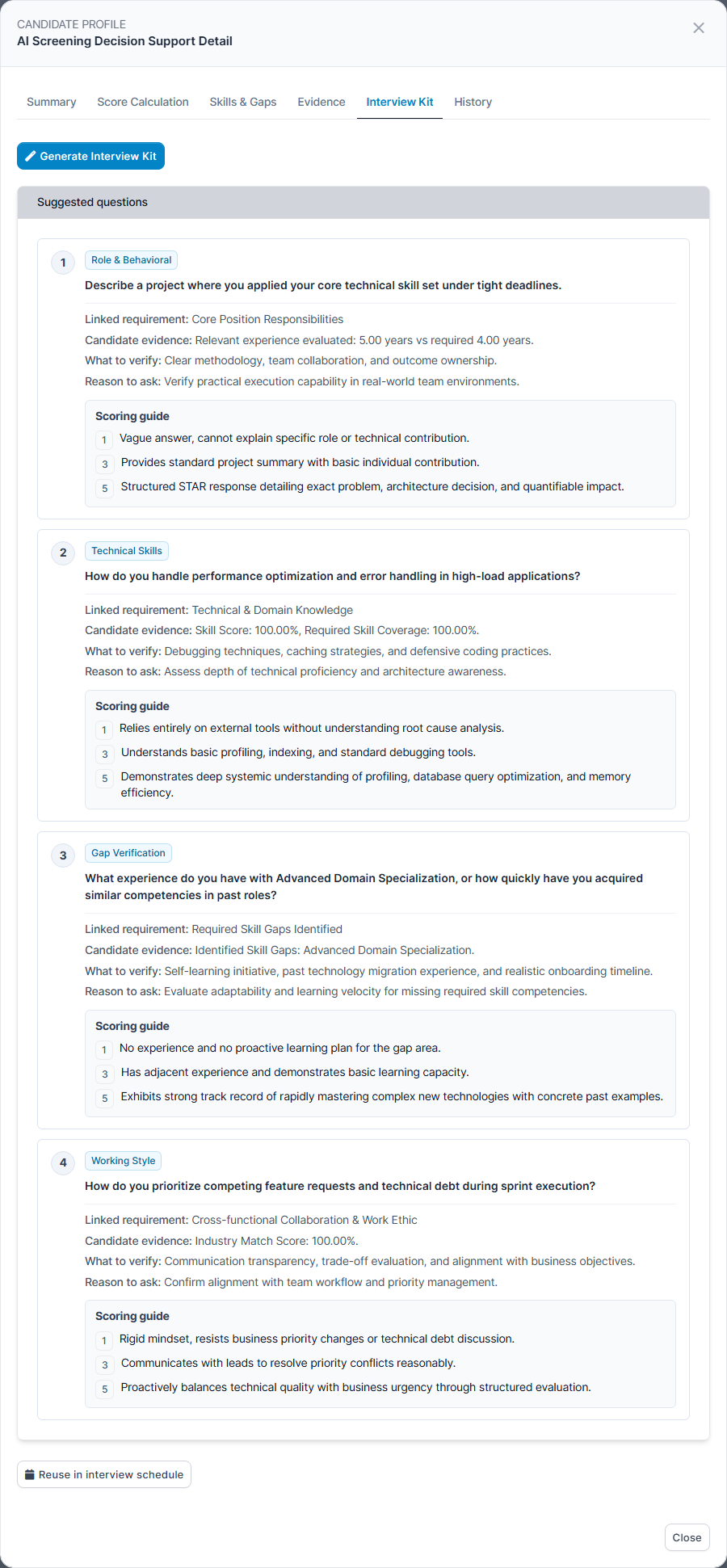
CV Screening & JD Match bridges this gap by automatically converting candidate-specific Missing Required Skills and unverified claims into structured behavioral interview kits. Rather than guessing what to ask, the interview panel receives tailored question prompts targeting the exact areas where the candidate's resume lacked verified evidence.
2. Generating the Structured Interview Kit
- Open the Candidate Detail Modal by clicking the View Detail (Eye icon) on the ranking table.
- Navigate to Tab 5: Interview Kit.
- Click the blue Generate Interview Kit button.
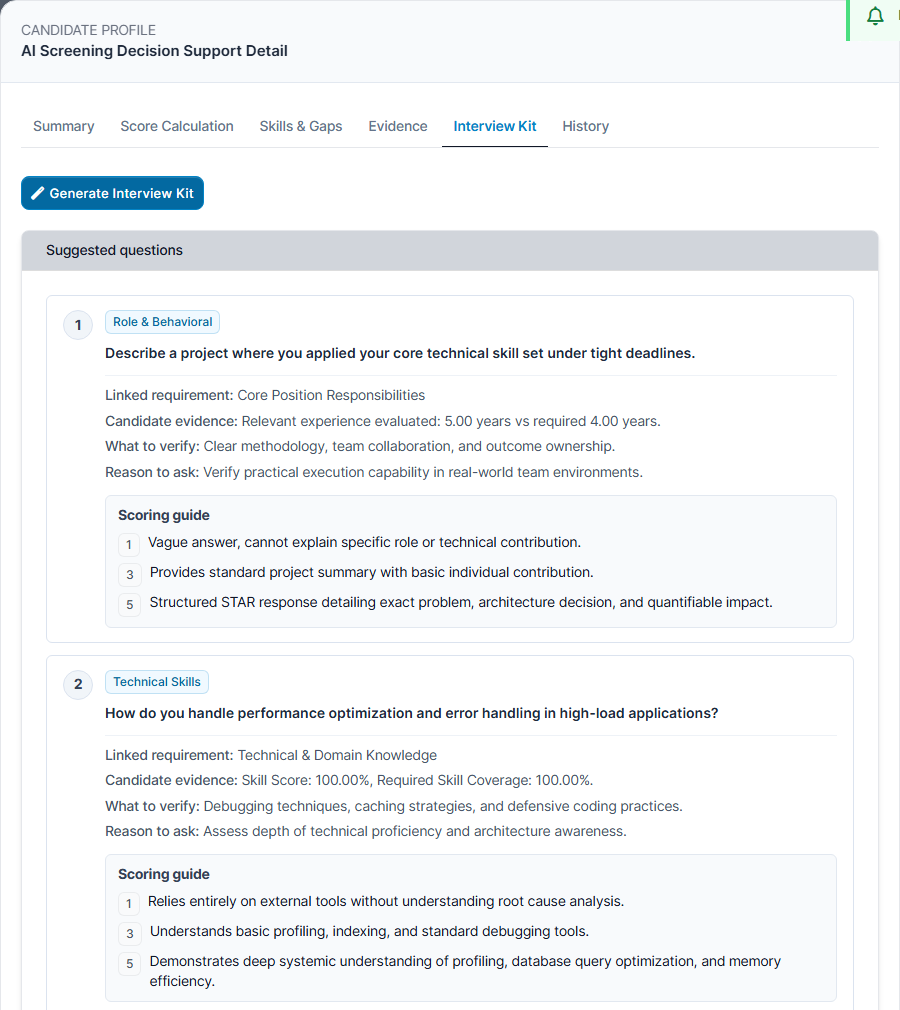
- The engine analyzes the candidate's detected skill gaps and generates 3 to 5 tailored behavioral questions structured under the STAR methodology.
3. STAR Behavioral Question Methodology
Every generated question adheres to the proven STAR framework, compelling candidates to provide verifiable real-world examples rather than hypothetical claims:
| STAR Dimension | Interviewer Probe Objective | Expected Candidate Articulation |
|---|---|---|
| S — Situation | Establish the context and business environment. | Describes a concrete project, operational challenge, or incident in a previous role. |
| T — Task | Identify the candidate's explicit responsibility. | Explains their specific role and technical objective in resolving the situation. |
| A — Action | Examine technical depth and problem-solving execution. | Articulates the exact engineering tools, architectural decisions, and steps taken. |
| R — Result | Quantify business value and measurable outcome. | Shares measurable outcomes (e.g., latency reduced by 40%, zero downtime during migration). |
4. Calibrated 1-3-5 Scoring Rubric Scale
To ensure consistent scoring across multiple interviewers, each question is paired with an objective 1-3-5 evaluation rubric:
| Rubric Score | Rating Level | Evaluation Behavioral Criteria |
|---|---|---|
| Score 1 | Unsatisfactory | Candidate gives vague, theoretical, or evasive answers. Unable to describe real project hands-on implementation or measurable results. |
| Score 3 | Meets Expectations | Candidate articulates a valid real-world scenario, demonstrates baseline competency, and achieved acceptable results with standard industry tools. |
| Score 5 | Exceptional | Candidate demonstrates deep mastery, complex trade-off analysis, proactive problem resolution, and outstanding quantified business impact. |
5. Navigating to Interview Schedule via "Reuse in interview schedule"
Once the interview kit has been generated and reviewed, recruiters can quickly transition from candidate evaluation to the interview scheduling workspace:
- At the bottom of the Candidate Detail Modal, click the button labeled Reuse in interview schedule (identified by the calendar icon).
- System Navigation & Filter Behavior:
- The system automatically redirects you to the native Recruitment > Interview Schedule screen.
- On this screen, the schedule view automatically filters by the current date (today), allowing recruiters to immediately inspect existing interview slots and assessor availability for the day.
- Operational Note: The button serves as a rapid transition to the interview schedule screen; it does not automatically pop up a pre-filled creation modal or insert text into schedule forms. Recruiters create or coordinate interviews according to standard CRM scheduling workflows.
- How Interview Kits are Referenced During Interviews:
- The generated STAR behavioral questions, candidate evidence, and calibrated 1-3-5 scoring rubrics remain permanently saved within the candidate's AI Screening Profile under the Interview Kit tab.
- During interview sessions, interviewers open the candidate's Screening Detail Modal to evaluate responses in real time against the suggested questions and objective 1-3-5 scoring guidelines. Recruiters may also copy specific question prompts into their interview agenda if desired.
6. Next Steps
To study authentic candidate profile showcases, configure global scoring weights, and master troubleshooting workflows, proceed to Guide 5: Profile Showcases, Settings & Troubleshooting.